Regional NAT
AWS accounced the launch of Regional NAT Gateway, a significant enhancement to their networking services. This new feature allows users to create NAT Gateways that are accessible across multiple Availability Zones (AZs) within a region, providing improved redundancy and simplified management.
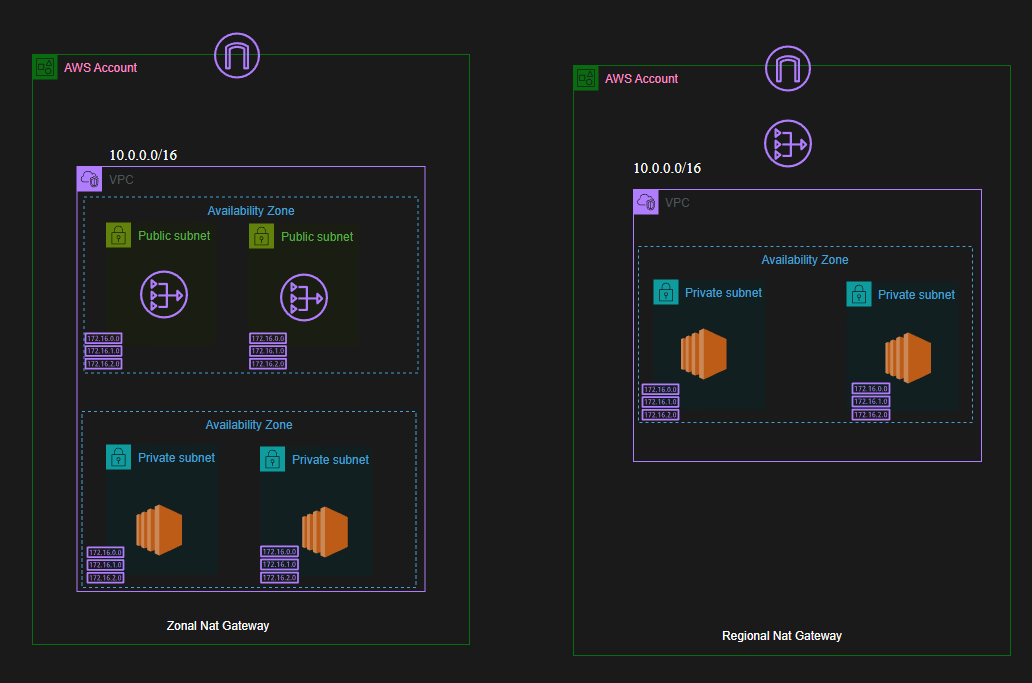
The above diagrams illustrate the difference between the traditional NAT Gateway and the new Regional NAT Gateway. In the traditional setup, each AZ requires its own NAT Gateway, leading to increased costs and complexity. With Regional NAT Gateway, a single NAT Gateway can serve multiple AZs, reducing the need for deploying each in a Public Subnet of every AZ.
Key Benefits of Regional NAT Gateway:
- Cost Efficiency: By eliminating the need for multiple NAT Gateways in each AZ, users can significantly reduce their networking costs.
- Enhanced Security: Without the need for a Public subnet in each AZ, it reduces the attack surface by reducing the chance for misconfiguration.
- Simplified Management: Managing a single Regional NAT Gateway is easier than handling multiple NAT Gateways across different AZs.
- High Availability: Regional NAT Gateway is designed to be highly available, ensuring that network traffic can flow seamlessly even if one AZ experiences issues.
When to Use Regional NAT Gateway:
- When you want to reduce costs associated with NAT Gateway deployments.
- When you need a simplified network architecture without the complexity of managing multiple NAT Gateways.
- Regional NAT Gateway does not offer private IP addressing or support for VPC endpoints. If your architecture requires these features, you may still need to use traditional NAT Gateways.
Using the AWS CLI to Create a Regional NAT Gateway:
To create a Regional NAT Gateway using the AWS CLI, you can use the following command:
If you want to view the NAT gateway details, use;
Delete a NAT gateway using: