Guide
LAB - Lambda Cross Account Using Bucket Policy
LAB - Lambda Cross Account Using Bucket Policy
IAM Architecture
ACCOUNT A
111111111111
│
│
├── Lambda
│
├── Execution Role
│   lambda-s3-cross-account-role
│
│   Policy:
│   sts:AssumeRole
│       ↓
│
└───────────────────────────────┐
                                │
                                ▼
ACCOUNT B                       │
222222222222                    │
│                               │
├── Lambdas3LisBucketPolicy ◄───┘
│   (s3:ListBucket)
|   Trust:
│   lambda-s3-cross-account-role (Role in Account A)
│
└── S3
    lambda-playroom-bucket-8899
Introduction
This lab demonstrates configuration of an IAM role (which is a type of Identity based policy) in AWS account B (the destination) that enables a Lambda function in AWS account 1 (the origin) to list the objects in that bucket using Python boto SDK.
Best practices
- Analyze public and cross-account access
- Share resources securely within your organization
- Share resources securely with a third party
Goals
- S3 bucket policies
- Resource based policies versus identity based policies
Prerequisites
- Two (2) AWS account that you are able to use for testing, that is not used for production or other purposes.
- An IAM user with MFA enabled that can assume roles in your AWS account.
- You will be billed for any applicable AWS resources used if you complete this lab that are not covered in the AWS Free Tier .
Steps:
- Clone the above GitHub Repo, cd into the
AWS-Account1, and edit thecreate_lambda_role.shscript to include your two AWS accounts.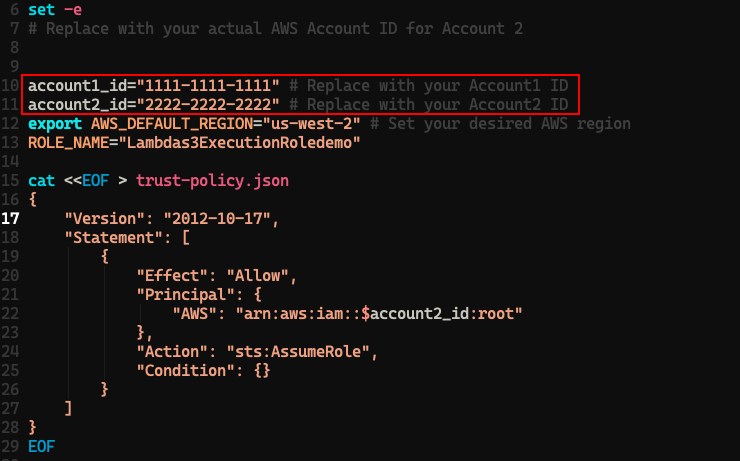
-
Run the
Now you have a new IAM role in our AWS aacount 1 namedcreate_lambda_role.shscript.Lambdas3ExecutionRoledemo.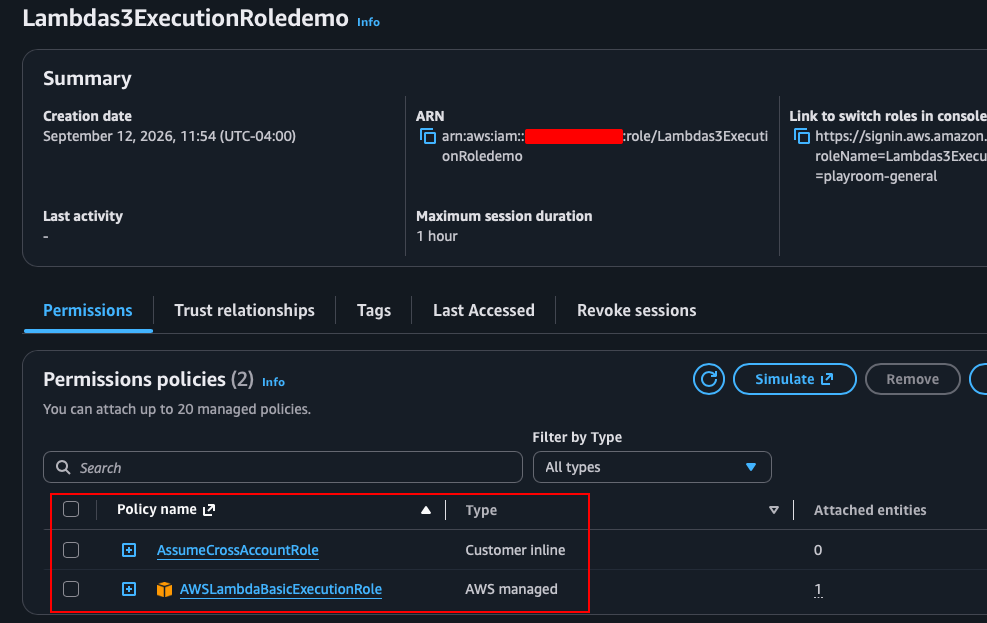
-
Identify (or create) S3 bucket in your AWS account 2
- Create role for Lambda in account 1
- Create bucket policy for the S3 bucket in account 2
- Create Lambda in account 1
- Invoke Lambda function
aws lambda invoke \ --function-name lambda-s3-cross-account \ --qualifier '$LATEST' \ --region us-east-1 \ --cli-binary-format raw-in-base64-out \ --payload '{}' \ response.json | jq # Ouput cat response.json | jq { "statusCode": 200, "body": "{\"account\": \"222222222222\", \"assumed_role\": \"arn:aws:sts::222222222222:assumed-role/Lambdas3LisBucketPolicy/lambda-1280f88e\", \"bucket\": \"lambda-playroom-bucket-8899\", \"objects\": [\"cognito-api.yaml\", \"iam-groups.yaml\"]}" } - Clean Up
Troubleshooting
Timeout Error
If you get a
You can always increase timeout to 30 seconds. Current timeout is 3 seconds.Handler Error
if you also get this error:
You can also update the lambda function handler, by runningReferences & useful resources
- Using IAM Policies
- Access Policies, Identity vs Resources