Guide
AWS Security Mini Lab - Automated Alerting for Excessive Unauthorized API Requests

1. Lab Overview
Lab Title: Automated Security Alerting for Excessive Unauthorized AWS API Requests
Scenario:
A company hosts its production workloads in AWS. The Security and Operations teams need an automated alerting solution to detect potential security threats involving excessive unauthorized AWS API requests.
An attacker, compromised IAM user, or misconfigured application may repeatedly attempt to access AWS resources without the necessary permissions. These attempts can indicate compromised credentials, privilege escalation attempts, or unauthorized activity.
The company requires a solution that automatically detects when the number of unauthorized AWS API requests exceeds a defined threshold within a specified time frame.
When the threshold is exceeded, both the Security and Operations teams must immediately receive an alert so they can investigate and respond.
Lab Objectives
By completing this lab, you will learn how to:
- Monitor AWS API activity using AWS CloudTrail.
- Detect excessive unauthorized API requests using Amazon CloudWatch.
- Configure metric filters to identify
AccessDeniedandUnauthorizedOperationevents. - Create CloudWatch alarms based on a defined request threshold and time window.
- Use Amazon SNS to distribute security alerts to multiple teams.
- Validate the alerting solution by generating simulated unauthorized API requests.
2. Lab Architecture
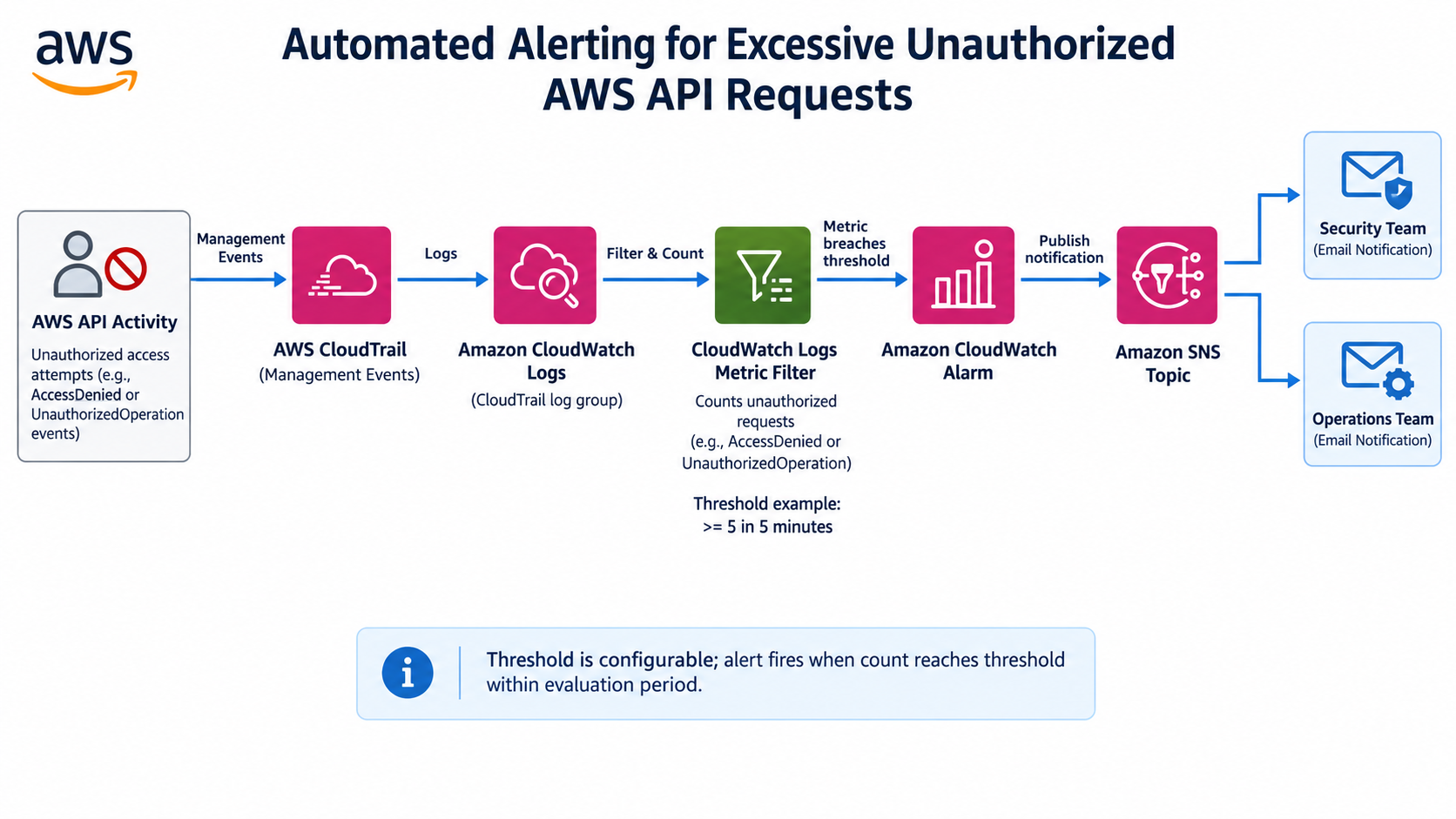
AWS Services Used
| AWS Service | Purpose |
|---|---|
| AWS CloudTrail | Records AWS API activity and unauthorized requests |
| Amazon CloudWatch Logs | Stores and evaluates CloudTrail log events |
| CloudWatch Metric Filter | Counts unauthorized API requests |
| Amazon CloudWatch Alarm | Detects when the unauthorized request threshold is reached |
| Amazon SNS | Distributes alerts to Security and Operations |
| Delivers notifications to both teams |
The architecture uses a CloudTrail-to-CloudWatch metric filter and alarm, with SNS distributing notifications to multiple recipients. This follows AWS's documented approach for monitoring unauthorized API calls. (docs.aws.amazon.com)
3. Lab Scenario Configuration
For this mini lab, use the following sample detection threshold:
| Configuration | Value |
|---|---|
| AWS Region | US East (Ohio) — us-east-2 |
| CloudTrail Log Group | /aws/cloudtrail/unauthorized-api-lab |
| Metric Namespace | SecurityMonitoring |
| Metric Name | UnauthorizedApiRequestCount |
| Detection Threshold | 5 unauthorized API requests |
| Evaluation Period | 5 minutes |
| Alarm Condition | 5 or more events within 5 minutes |
| SNS Topic | UnauthorizedApiAlertTopic |
| Notification Recipients | Security team and Operations team |
| Alert Delivery | Email via Amazon SNS |
Expected outcome:
When five or more matching unauthorized API requests are recorded within a five-minute period, CloudWatch transitions the alarm to ALARM and publishes a notification to the SNS topic.
The threshold is a lab example, not a universal security baseline. CloudWatch evaluates the metric over configured periods, and alert delivery depends on successful event ingestion, alarm evaluation, and confirmed SNS subscriptions.
4. Lab Implementation Steps
Step 1: Enable AWS CloudTrail
-
Sign in to the AWS Management Console.
-
Switch to US East (Ohio) —
us-east-2. -
Navigate to AWS CloudTrail.
-
Select Create trail.
-
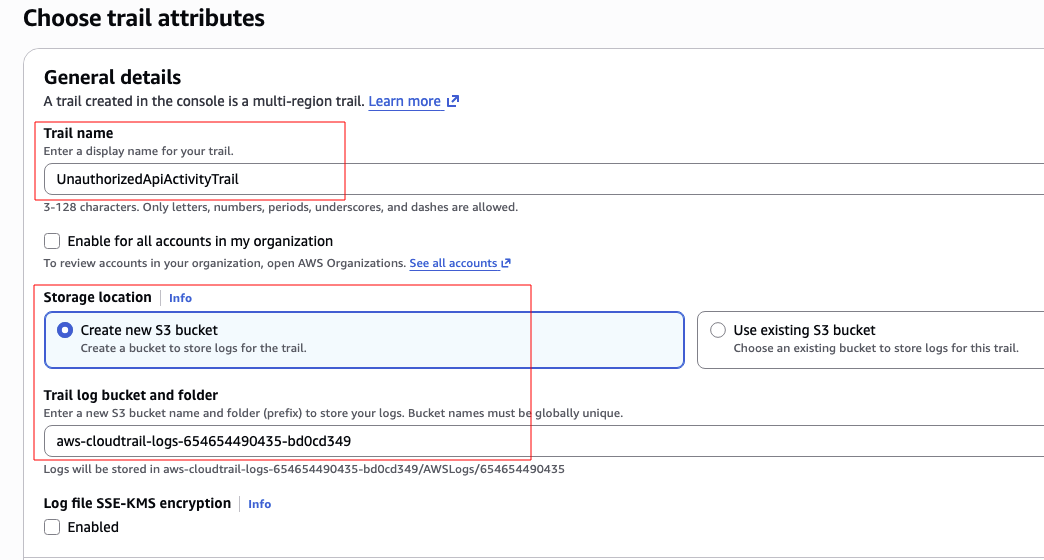
Enter the trail name:
- Select Storage location
-
Enable management events for read and write operations.
-
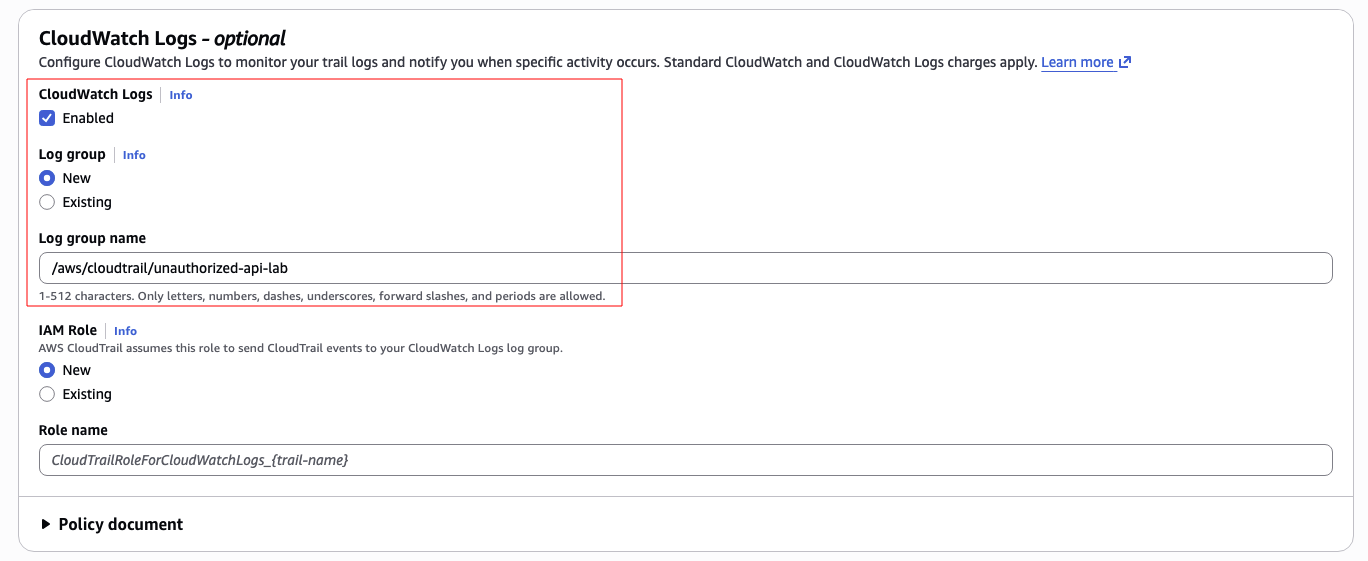
Configure CloudTrail to deliver events to CloudWatch Logs.
-
Create or select the CloudWatch Logs log group:
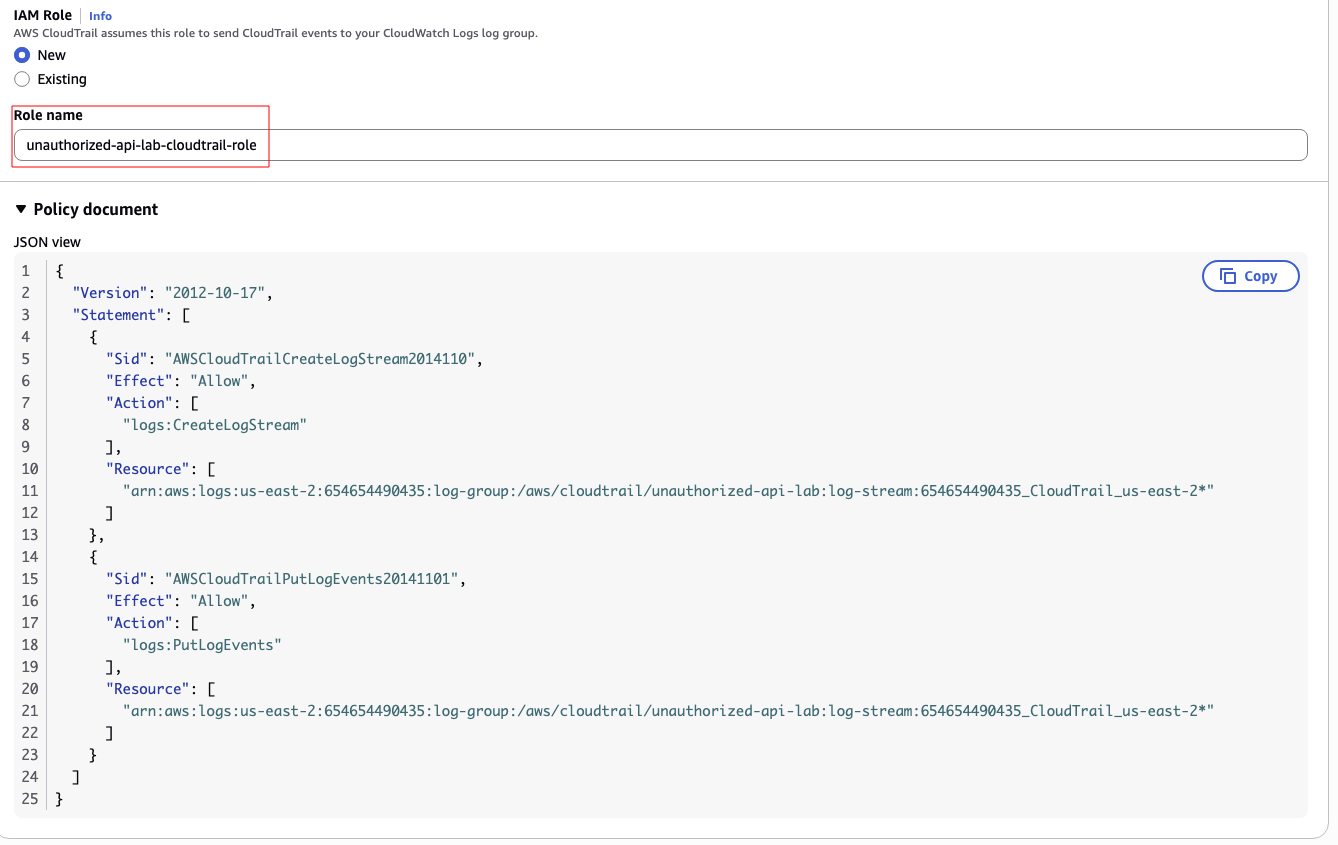
- Configure the required IAM role for CloudTrail to deliver events to CloudWatch Logs.
- Create the trail.

CloudTrail management events provide visibility into AWS management API activity, including requests that fail authorization checks.
Step 2: Create a CloudWatch Metric Filter
The metric filter will identify unauthorized API requests in CloudTrail logs.
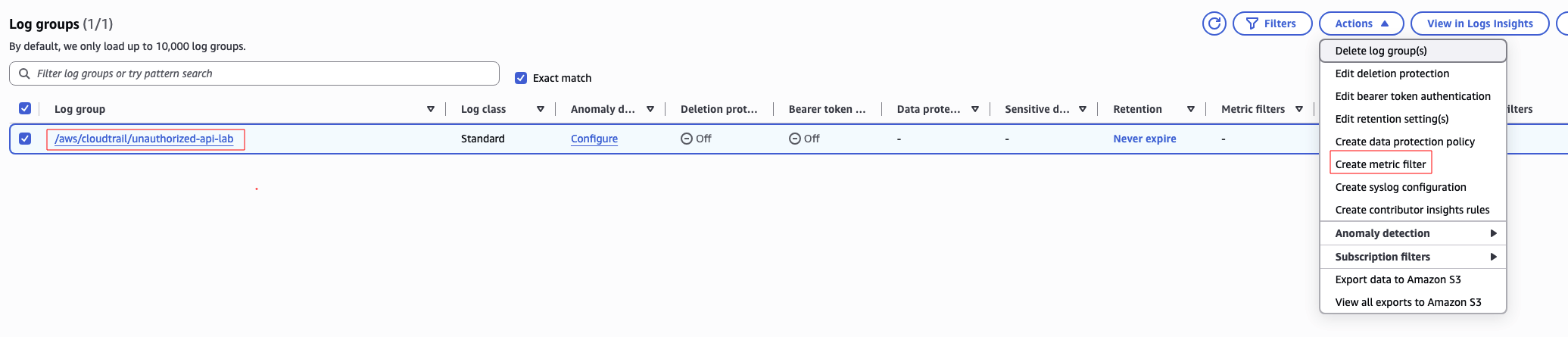
- Navigate to Amazon CloudWatch → Logs → Log groups.
- Select
/aws/cloudtrail/unauthorized-api-lab. - Choose Create metric filter.
- Enter the following filter pattern:
This pattern matches CloudTrail events with error codes ending in UnauthorizedOperation or beginning with AccessDenied.
- Configure the metric:
| Field | Value |
|---|---|
| Filter Name | UnauthorizedApiRequestFilter |
| Metric Namespace | SecurityMonitoring |
| Metric Name | UnauthorizedApiRequestCount |
| Metric Value | 1 |
| Default Value | 0 |
- Test the filter pattern against available log events.
- Create the metric filter.
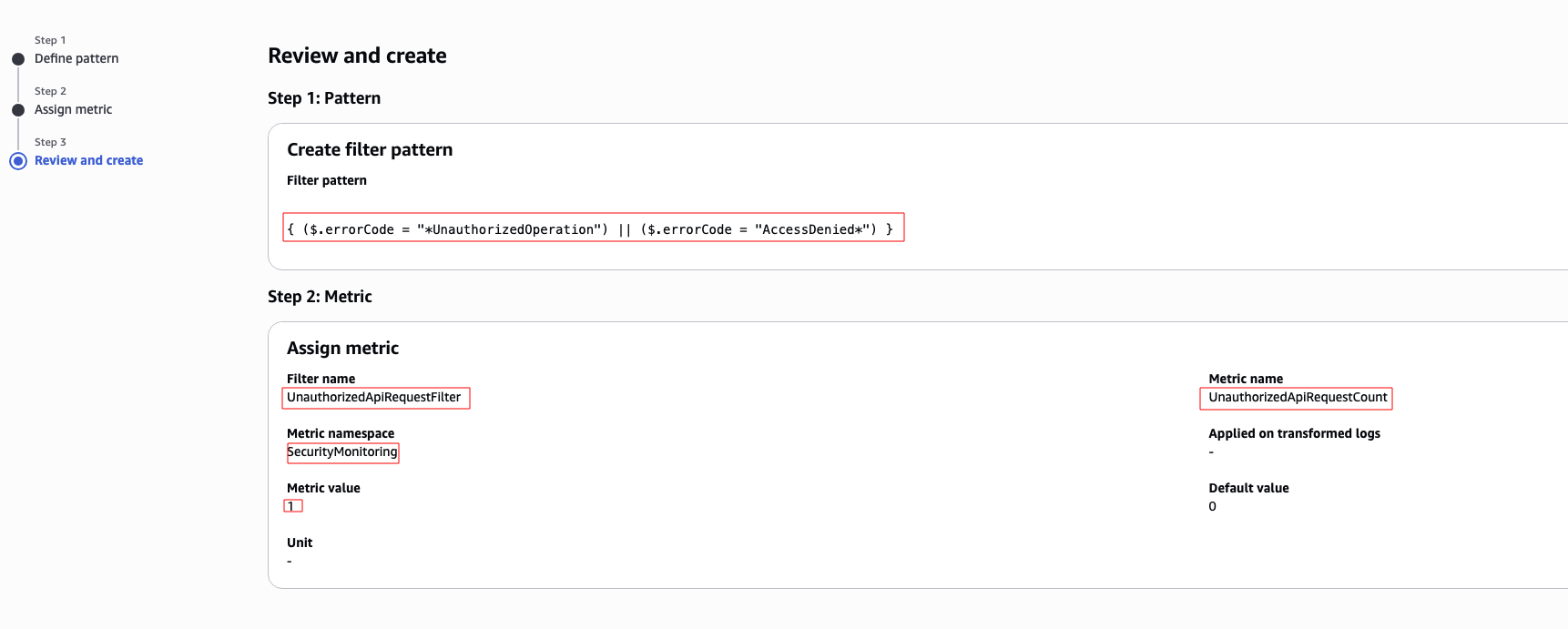
Each matching log event contributes 1 to the custom metric, allowing CloudWatch to count unauthorized API requests over time.
Step 3: Create an Amazon SNS Topic
SNS will distribute the alert to both teams.
-
Navigate to Amazon SNS → Topics.
-
Select Create topic.
-
Choose Standard.
-
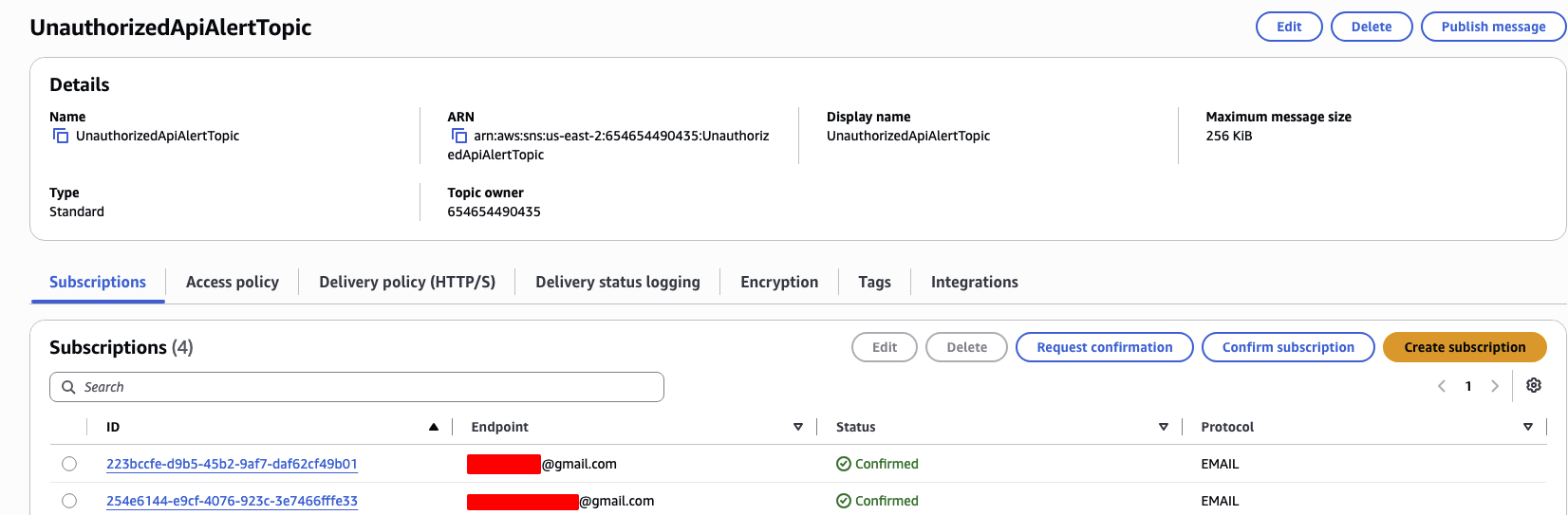
Enter the topic name:
UnauthorizedApiAlertTopic
-
Create the topic.
-
Open the topic and select Create subscription.
-
Configure the Security team subscription:
-
Protocol:
Email -
Endpoint: Security team's distribution email address
-
Create a second subscription for the Operations team:
-
Protocol:
Email -
Endpoint: Operations team's distribution email address
-
Confirm the subscription using the confirmation email sent to each team.
Both subscriptions must be confirmed to receive email notifications.
Step 4: Create the CloudWatch Alarm
- Navigate to CloudWatch → Alarms → Create alarm.
-
Select the metric created in Step 2:
-
Namespace:
SecurityMonitoring - Metric:
UnauthorizedApiRequestCount - Configure the alarm conditions:
| Alarm Setting | Value |
|---|---|
| Statistic | Sum |
| Period | 5 minutes |
| Threshold Type | Static |
| Comparison Operator | Greater than or equal to |
| Threshold | 5 |
| Evaluation Periods | 1 |
| Datapoints to Alarm | 1 |
-
Under Notification, select the
UnauthorizedApiAlertTopicSNS topic for theIn alarmstate. -
Name the alarm:
ExcessiveUnauthorizedApiRequestsAlarm
- Add a description:
Triggers when 5 or more unauthorized AWS API requests are detected within a 5-minute period.
- Review and create the alarm.

The alarm now monitors the custom metric and publishes an SNS notification when the configured threshold is met.
5. Lab Validation: Simulate Unauthorized API Requests
Objective
Generate at least five unauthorized AWS API requests within five minutes and verify that both teams receive an alert.
Test Procedure
- Use a dedicated test IAM user or role with limited permissions.
- Ensure it does not have permission to perform the API actions used in the test.
- Using those credentials, attempt several unauthorized API calls, such as describing a restricted resource.
- Generate at least five failed authorization requests within five minutes.
- Navigate to CloudWatch → Metrics → SecurityMonitoring.
- Verify that
UnauthorizedApiRequestCounthas increased.
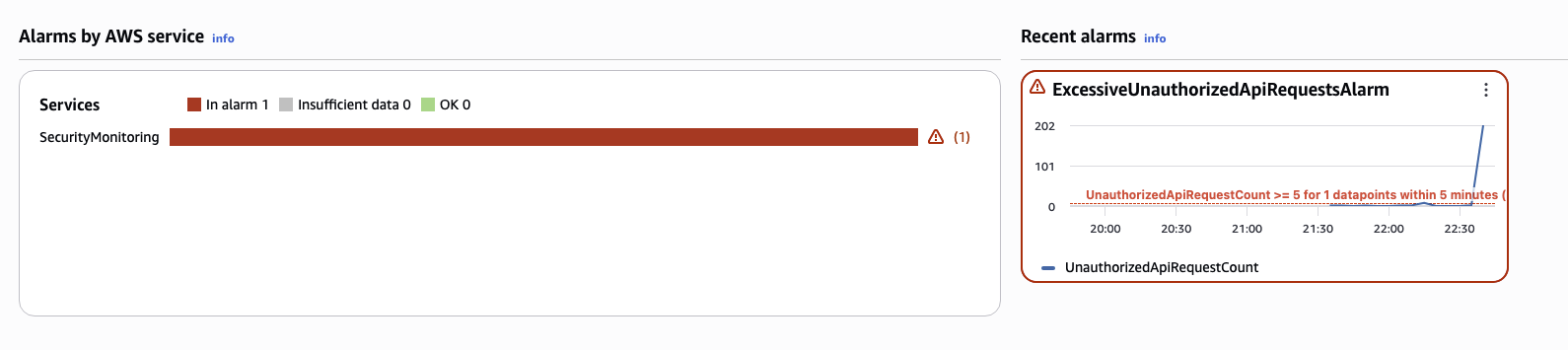 7. [x] Navigate to CloudWatch → Alarms.
8. [x] Verify that
ExcessiveUnauthorizedApiRequestsAlarm transitions to ALARM.
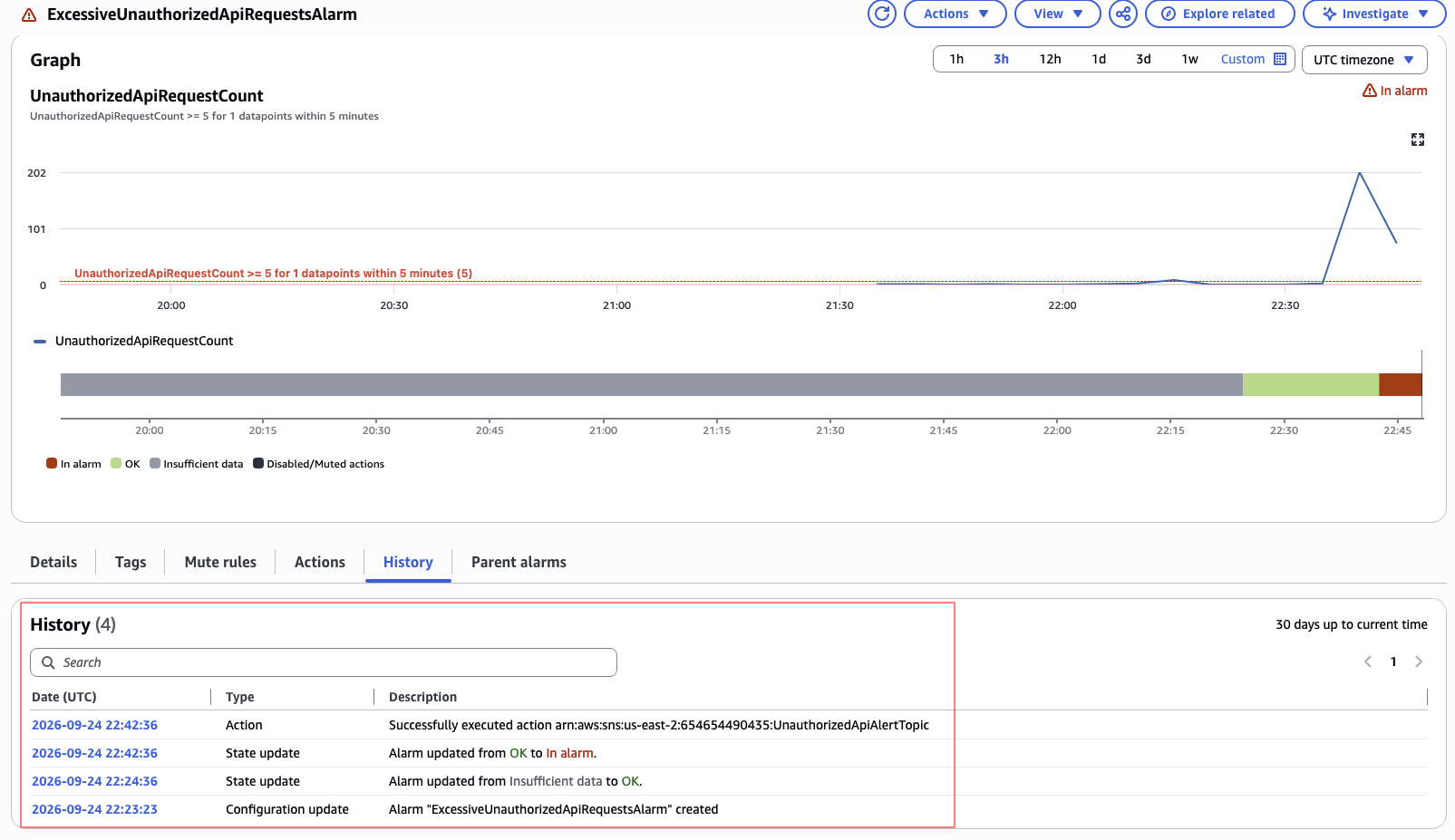
- Check the Security and Operations team inboxes for the SNS notification.
Important: Use a test identity and controlled API calls. Do not generate unauthorized requests against production resources.
Expected Results
| Test | Expected Result |
|---|---|
| 1–4 matching unauthorized requests | Alarm remains below threshold |
| 5 or more matching requests within 5 minutes | CloudWatch alarm enters ALARM |
Alarm enters ALARM |
SNS publishes a notification |
| SNS notification published | Both confirmed email subscribers receive the alert |
Note that CloudTrail delivery and CloudWatch metric evaluation are not instantaneous, so the alert may arrive shortly after the test requests are generated.
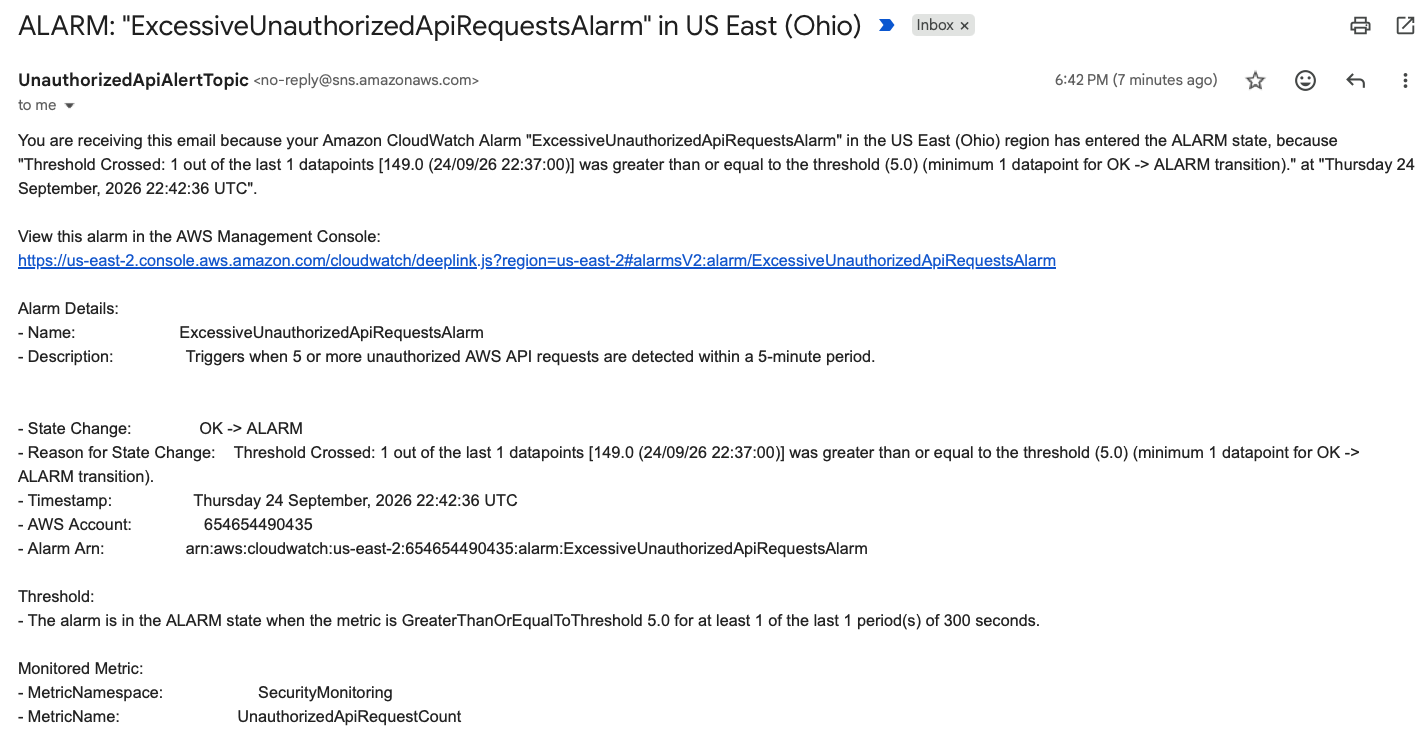
6. Sample Security Alert
The Security and Operations teams should receive an alert similar to the following:
7. Troubleshooting
| Issue | What to Check |
|---|---|
| Metric does not increase | Confirm CloudTrail is delivering management events to the correct log group |
| Unauthorized events are not matched | Verify the metric filter pattern against actual CloudTrail errorCode values |
| Alarm does not trigger | Verify the metric period, statistic, threshold, and alarm history |
| Security team receives no email | Verify SNS subscription confirmation |
| Operations team receives no email | Verify the Operations subscription and email endpoint |
| Alarm triggers late | Review CloudTrail delivery latency and CloudWatch alarm evaluation |
8. Lab Cleanup
To avoid ongoing AWS charges and unnecessary resources:
- Delete test iam user
- Delete the CloudWatch alarm.
- Delete the CloudWatch metric filter.
- Delete the SNS subscriptions first before you delete the SNS topic.
- Delete the dedicated CloudTrail trail if it was created solely for this lab.
- Delete the associated CloudWatch Logs log group if it is no longer needed.
Retain any audit logs required by your organization's security or retention policies.
9. Learning Outcomes
After completing this mini lab, the learner should be able to demonstrate how to:
- Detect excessive unauthorized AWS API requests using CloudTrail and CloudWatch.
- Configure a threshold-based security alert.
- Automatically distribute alerts to multiple operational teams using SNS.
- Validate an AWS security monitoring solution using controlled test events.
Lab Success Criteria: Both the Security and Operations teams receive an SNS email notification after the configured unauthorized API request threshold is reached within the defined time window.