Guide
AWS Lab - Automated remediation with Config

Lab Scenario
Lab Scenario
A company wants to enforce security standards across its AWS environment.
The security team has defined the following VPC requirements:
- VPC Flow Logs must be enabled.
- DNS support must be enabled.
- DNS hostnames must be enabled.
- The VPC must not use an Internet Gateway unless explicitly approved.
- VPCs must have a required tag:
- Environment
- Owner
The security engineer must implement a solution that:
Automatically detects non-compliant VPCs and performs an appropriate remediation action without requiring manual intervention.
You will deliberately create a non-compliant VPC and then watch the security automation detect and remediate it.
What You Will Build
The final architecture will look roughly like this:
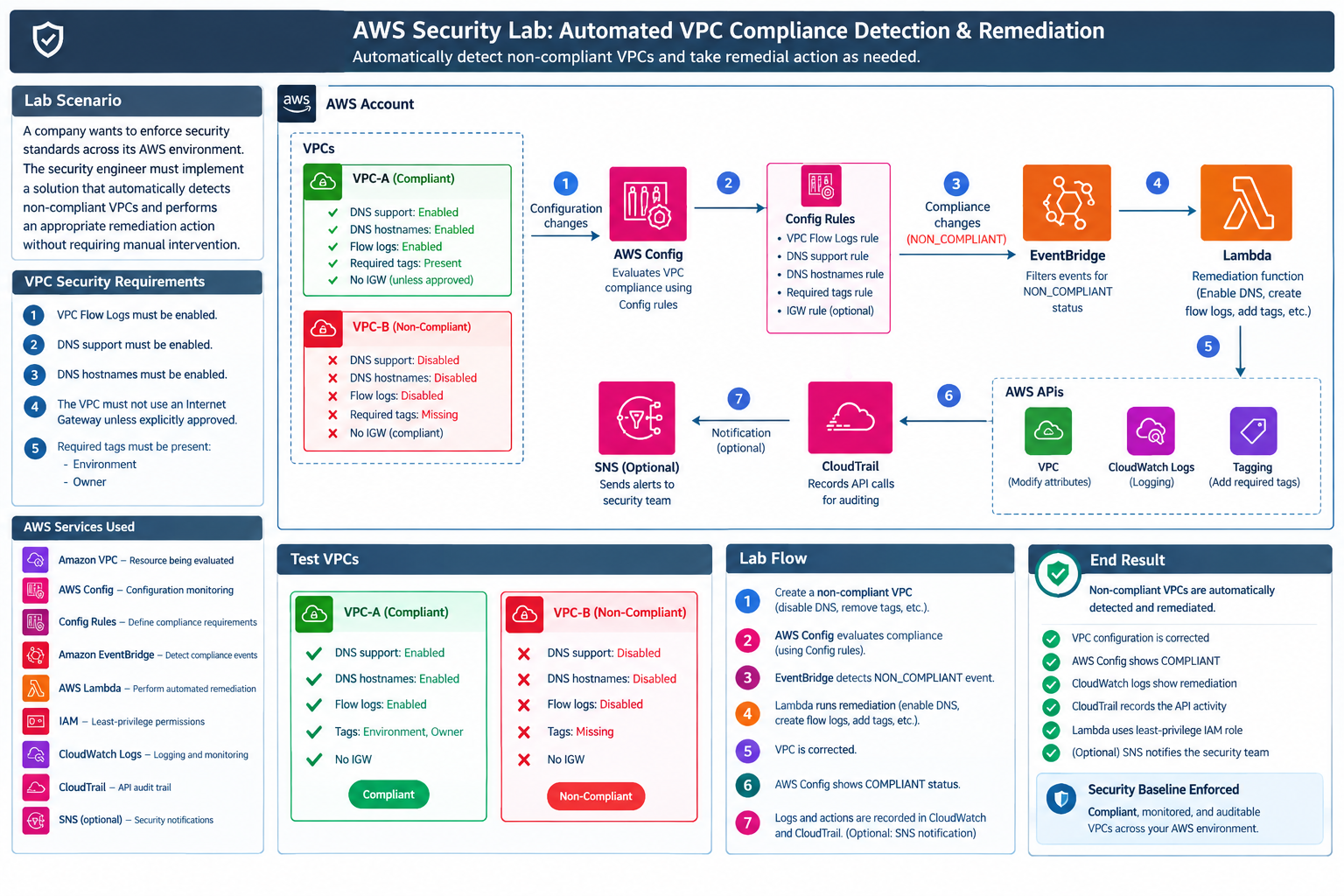
AWS Services Used
| Service | Purpose |
|---|---|
| Amazon VPC | Resource being evaluated |
| AWS Config | Detect configuration violations |
| AWS Config Rules | Define compliance requirements |
| Amazon EventBridge | Detect compliance-state changes |
| AWS Lambda | Perform automated remediation |
| IAM | Least-privilege permissions |
| CloudWatch Logs | Lambda/remediation logging |
| CloudTrail | API activity/audit trail |
| SNS | Optional security notifications |
This lab is particularly useful for understanding the difference between:
Lab Objectives
By completing this lab you should be able to:
- Configure AWS Config.
- Create AWS Config rules.
- Evaluate VPC compliance.
- Interpret COMPLIANT vs NON_COMPLIANT.
- Create EventBridge compliance events.
- Trigger Lambda from EventBridge.
- Implement automated remediation.
- Create least-privilege Lambda IAM permissions.
- Verify remediation.
- Investigate remediation activity using CloudTrail.
- Build a security automation workflow.
⸻
- Recommended Lab Design
I recommend creating two VPCs.
VPC-A — Compliant
VPC-A
 ├── DNS Support       ENABLED
 ├── DNS Hostnames     ENABLED
 ├── Flow Logs         ENABLED
 └── Required Tags     PRESENT
VPC-B — Non-Compliant
VPC-B
 ├── DNS Support       DISABLED
 ├── DNS Hostnames     DISABLED
 ├── Flow Logs         DISABLED
 └── Required Tags     MISSING
This gives you something important in a security lab:
A known-good state and a known-bad state.
Phase 1 — Create the Test VPC
Create a VPC in your chosen region.
For example:
aws ec2 create-vpc \
  --cidr-block 10.50.0.0/16 \
  --tag-specifications \
  'ResourceType=vpc,Tags=[{Key=Name,Value=Security-Lab-VPC}]'
Save the VPC ID:
VPC_ID=vpc-xxxxxxxx
Phase 2 — Deliberately Make the VPC Non-Compliant
This is important.
You’re going to simulate a security violation.
Disable DNS support:
Disable DNS hostnames:Do not add the required security tags.
Now your VPC intentionally violates the security baseline.
Phase 3 — Configure AWS Config
AWS Config will act as your configuration-monitoring engine.
Conceptually:
AWS Config
│
┌────────────┼─────────────┐
│ │ │
▼ ▼ ▼
VPC DNS VPC Flow Required
Rule Logs Tags
│ │ │
└────────────┼─────────────┘
▼
Compliance State
For a real organization, AWS Config would typically be enabled across the relevant accounts and Regions using AWS Organizations.
For this lab, you can enable it in one account and one Region.
⸻
Phase 4 — Create Config Rules
You can use AWS managed Config rules where they fit, and a custom rule where you need organization-specific behavior.
Some useful VPC-related rules include:
Rule 1 — VPC Flow Logs
Require VPC Flow Logs.
Concept:
Rule 2 — VPC DNS Support
Require DNS support.
enableDnsSupport == true
Rule 3 — VPC DNS Hostnames
Require:
enableDnsHostnames == true
Rule 4 — Required Tags
For example:
Environment Owner
Your security baseline becomes:
Phase 5 — Define Your Compliance Model
A useful approach is to classify violations by remediation type.
Violation Automatic remediation? DNS support disabled Yes DNS hostnames disabled Yes Flow logs disabled Yes Missing Owner tag Maybe Missing Environment tag Maybe Unauthorized Internet Gateway Depends on business requirements
This introduces an important real-world security engineering concept:
Not every detected violation should automatically be fixed.
For example, automatically deleting an Internet Gateway could break production applications.
For the lab, however, we’ll automatically remediate the relatively safe configuration changes.
⸻
Phase 6 — EventBridge
AWS Config will produce events when compliance status changes.
The workflow becomes:
An EventBridge rule can filter for:
source: aws.config detail-type: Config Rules Compliance Change complianceType: NON_COMPLIANT
Conceptually:
{ "source": [ "aws.config" ], "detail-type": [ "Config Rules Compliance Change" ], "detail": { "newEvaluationResult": { "complianceType": [ "NON_COMPLIANT" ] } } }
This prevents Lambda from executing for every Config event.
⸻
- Phase 7 — Lambda Remediation Function
Now create the security remediation Lambda.
The Lambda receives something similar to:
Config Rule │ ▼ NON_COMPLIANT │ ▼ EventBridge │ ▼ Lambda │ ├── Determine VPC │ ├── Determine violated rule │ └── Execute remediation
A simplified Python implementation could look like:
import boto3 import os import logging logger = logging.getLogger() logger.setLevel(logging.INFO) ec2 = boto3.client("ec2") def lambda_handler(event, context): logger.info("Received event: %s", event) detail = event.get("detail", {}) config_item = detail.get("configurationItem", {}) vpc_id = config_item.get("resourceId") rule_name = detail.get("configRuleName") if not vpc_id: logger.error("Unable to determine VPC ID") return { "statusCode": 400, "message": "VPC ID not found" } logger.info( "Remediating VPC %s for rule %s", vpc_id, rule_name ) if "dns-support" in rule_name: ec2.modify_vpc_attribute( VpcId=vpc_id, EnableDnsSupport={ "Value": True } ) elif "dns-hostnames" in rule_name: ec2.modify_vpc_attribute( VpcId=vpc_id, EnableDnsHostnames={ "Value": True } ) else: logger.info( "No remediation configured for rule %s", rule_name ) return { "statusCode": 200, "vpcId": vpc_id, "rule": rule_name }
For the actual lab, I recommend expanding this into a more robust function that explicitly maps known Config rule names to remediation actions rather than relying on loose string matching.
⸻
- Phase 8 — Lambda IAM Role
This is an excellent opportunity to practice least privilege.
Do not give Lambda:
AdministratorAccess
Instead, give it only what it needs.
For example:
{ "Version": "2012-10-17", "Statement": [ { "Effect": "Allow", "Action": [ "ec2:ModifyVpcAttribute", "ec2:DescribeVpcs" ], "Resource": "" }, { "Effect": "Allow", "Action": [ "logs:CreateLogGroup", "logs:CreateLogStream", "logs:PutLogEvents" ], "Resource": "" } ] }
You’ll notice something important:
Lambda │ ├── Describe VPC ├── Modify VPC attributes │ └── Write CloudWatch logs
Nothing else.
⸻
- Phase 9 — EventBridge → Lambda
Configure the EventBridge rule to invoke Lambda.
Architecture:
AWS Config
│
│ Compliance Change
▼
┌─────────────┐
│ EventBridge │
└──────┬──────┘
│
│ NON_COMPLIANT
▼
┌─────────────┐
│ Lambda │
│ Remediation │
└──────┬──────┘
│
▼
VPC
You’ll also need the appropriate Lambda resource policy allowing EventBridge to invoke the function.
⸻
- Phase 10 — Trigger the Attack/Violation
Now comes the fun part.
Start with:
VPC-B
Disable DNS support:
aws ec2 modify-vpc-attribute \
  --vpc-id $VPC_ID \
  --no-enable-dns-support
Disable DNS hostnames:
aws ec2 modify-vpc-attribute \
  --vpc-id $VPC_ID \
  --no-enable-dns-hostnames
You have now simulated a configuration drift/security violation.
⸻
- Observe AWS Config
Go to:
AWS Console ↓ AWS Config ↓ Rules
You should eventually see:
VPC-DNS-SUPPORT ↓ NON_COMPLIANT
and:
VPC-DNS-HOSTNAMES ↓ NON_COMPLIANT
This demonstrates:
Configuration Drift ↓ AWS Config Detection
⸻
- Observe EventBridge
Navigate to:
EventBridge ↓ Rules ↓ VPC-Security-Remediation
Check the monitoring/metrics.
You want to demonstrate:
AWS Config │ ▼ Compliance Change │ ▼ EventBridge │ ▼ Lambda Invocation
⸻
- Observe Lambda
Go to:
Lambda ↓ Functions ↓ VPC-Security-Remediation ↓ Monitor ↓ CloudWatch Logs
You should see something similar to:
Received compliance event VPC: vpc-0123456789 Rule: vpc-dns-support Status: NON_COMPLIANT Remediation: EnableDnsSupport Result: SUCCESS
⸻
- Verify Remediation
Check the VPC:
aws ec2 describe-vpc-attribute \ --vpc-id $VPC_ID \ --attribute enableDnsSupport
You want:
{ "EnableDnsSupport": { "Value": true } }
Then:
aws ec2 describe-vpc-attribute \ --vpc-id $VPC_ID \ --attribute enableDnsHostnames
Expected:
{ "EnableDnsHostnames": { "Value": true } }
The complete security loop is now:
         ┌─────────────────────┐
         │     VPC Baseline    │
         └──────────┬──────────┘
                    │
                    ▼
             AWS Config
                    │
                    ▼
            NON_COMPLIANT
                    │
                    ▼
              EventBridge
                    │
                    ▼
                Lambda
                    │
                    ▼
              Remediation
                    │
                    ▼
              VPC corrected
                    │
                    ▼
             AWS Config
                    │
                    ▼
               COMPLIANT
⸻
- Phase 11 — CloudTrail Investigation
Now investigate the remediation from a security-auditing perspective.
Search CloudTrail for:
ModifyVpcAttribute
You should be able to establish:
Who performed the action? ↓ Lambda execution role What action? ↓ ModifyVpcAttribute What resource? ↓ VPC ID When? ↓ Timestamp Why? ↓ Automated remediation workflow
This is a valuable security-engineering exercise because automation itself needs to be auditable.
⸻
- Add SNS Security Notifications
Take the lab one step further.
Add:
AWS Config │ ▼ EventBridge │ ├───────────────┐ ▼ ▼ Lambda SNS │ │ ▼ ▼ Remediate Security Team
The notification could say:
AWS SECURITY AUTOMATION ALERT Resource: vpc-0123456789 Config Rule: vpc-dns-support Previous State: NON_COMPLIANT Action: EnableDnsSupport Remediation: SUCCESS Timestamp: 2026-09-16T...
⸻
- Advanced Challenge — VPC Flow Logs
Once DNS remediation works, implement automatic Flow Log remediation.
The desired workflow:
VPC │ │ Flow Logs missing ▼ AWS Config │ │ NON_COMPLIANT ▼ EventBridge │ ▼ Lambda │ ▼ CreateFlowLogs │ ▼ CloudWatch Logs / S3
Your Lambda will need additional permissions such as:
ec2:CreateFlowLogs ec2:DescribeFlowLogs
Depending on the destination, you’ll also need the appropriate permissions/configuration for CloudWatch Logs or S3.
⸻
- Advanced Challenge — Required Tags
Now implement:
Environment Owner
For example:
Environment = Production Owner = Security
The workflow becomes:
VPC │ │ Missing Owner tag ▼ AWS Config │ ▼ NON_COMPLIANT │ ▼ EventBridge │ ▼ Lambda │ ▼ Add required tag
However, think carefully about where the tag value comes from.
For example, automatically setting:
Owner=Security
may be incorrect.
A production solution might instead:
NON_COMPLIANT │ ▼ SNS / Ticket │ ▼ Human approval │ ▼ Remediation
This introduces an important security architecture principle:
Automate deterministic remediation; escalate ambiguous remediation.
⸻
- Advanced Challenge — Unauthorized Internet Gateway
Create another Config rule that identifies VPCs containing an Internet Gateway.
Example:
Corporate VPC Baseline Internet Gateway: NOT ALLOWED
Detection:
VPC │ ├── IGW attached? │ ├── NO → COMPLIANT │ └── YES → NON_COMPLIANT
But do not immediately delete the IGW.
Instead:
NON_COMPLIANT │ ▼ EventBridge │ ▼ Lambda │ ▼ SNS │ ▼ Security Team
This gives you a realistic distinction between:
Auto-remediate
Enable DNS support Enable DNS hostnames Create flow logs
and:
Human approval
Delete Internet Gateway Modify production routing Delete security group Change network ACL
⸻
- Build a Security Baseline
At the end of the lab, your VPC security baseline could look like:
┌─────────────────────────────────────────────┐ │ VPC SECURITY BASELINE │ ├─────────────────────────────────────────────┤ │ │ │ DNS Support REQUIRED ✓ │ │ DNS Hostnames REQUIRED ✓ │ │ VPC Flow Logs REQUIRED ✓ │ │ Environment Tag REQUIRED ✓ │ │ Owner Tag REQUIRED ✓ │ │ Unauthorized IGW PROHIBITED ✓ │ │ │ └─────────────────────────────────────────────┘
And the automation:
             ┌───────────────┐
             │      VPC      │
             └───────┬───────┘
                     │
                     ▼
             ┌───────────────┐
             │ AWS Config    │
             │               │
             │ Compliance    │
             │ Evaluation    │
             └───────┬───────┘
                     │
          ┌──────────┴──────────┐
          │                     │
      COMPLIANT             NON_COMPLIANT
          │                     │
          ▼                     ▼
      Continue              EventBridge
                                │
                   ┌────────────┴───────────┐
                   │                        │
                   ▼                        ▼
               Lambda                    SNS
                   │                     Alert
                   ▼
             Remediation
                   │
                   ▼
              VPC APIs
                   │
                   ▼
             AWS Config
                   │
                   ▼
              COMPLIANT
⸻
- Lab Validation Checklist
Your final lab should demonstrate all of these:
Detection
- AWS Config enabled.
- VPC Config rules created.
- Compliant VPC detected.
- Non-compliant VPC detected.
Event-driven automation
- EventBridge rule created.
- EventBridge filters NON_COMPLIANT.
- EventBridge invokes Lambda.
Remediation
- Lambda receives VPC ID.
- Lambda identifies violated rule.
- Lambda executes remediation.
- Remediation succeeds.
Verification
- VPC configuration corrected.
- AWS Config changes to COMPLIANT.
- CloudWatch logs show remediation.
- CloudTrail records the API call.
Security
- Lambda uses a dedicated IAM role.
- IAM permissions follow least privilege.
- Lambda cannot perform unrelated administrative actions.
- Security notifications are generated.
- Destructive actions require human approval.
⸻
- Final Challenge — Production-Style Version
Once you’ve completed the basic lab, turn it into a much more realistic security platform:
                     AWS ORGANIZATION
                            │
            ┌───────────────┼────────────────┐
            │               │                │
         Account A       Account B         Account C
         Production      Security          Development
            │               │                │
            └───────────────┼────────────────┘
                            │
                            ▼
                     AWS Config
                            │
                   Organization Rules
                            │
                            ▼
                     EventBridge
                            │
            ┌───────────────┼────────────────┐
            │               │                │
            ▼               ▼                ▼
         Lambda          SNS/SQS         Security Hub
            │               │                │
            ▼               ▼                ▼
       Remediation       Alerts          Findings
            │
            ▼
    ┌───────────────────┐
    │ AWS VPC Resources │
    └───────────────────┘
            │
            ▼
       CloudTrail
            │
            ▼
      Audit / SIEM
That version becomes a genuine AWS Cloud Security Posture Management (CSPM)-style project rather than simply a Config exercise.
Suggested progression
Level 1 — Detection
AWS Config detects VPC violations.
Level 2 — Event-driven remediation
EventBridge automatically invokes Lambda.
Level 3 — Security automation
Lambda fixes deterministic configuration violations.
Level 4 — Auditing
CloudTrail records every remediation action.
Level 5 — Notification
SNS alerts the security team.
Level 6 — Multi-account
AWS Organizations + delegated security account.
Level 7 — Production architecture
Centralized compliance, remediation, logging, alerting, exception management, and security analytics.
This would make an excellent addition to your broader AWS Monitoring, Alerting & Automated Remediation project because it specifically exercises the detect → respond → verify → audit portion of a cloud-security operations architecture.