Guide
AWS Lab - Ec2 instance with Compromised key-pair

1. Lab scenerio
Lab scenerio
A company discovers that an Amazon EC2 key pair named:
may have been exposed.
The security team needs to determine:
- Which EC2 instances were launched using this key pair?
- Where are those instances?
- When were they launched?
- What other metadata can help with the investigation?
- How can the security team contain the incident?
- How can the investigation be automated?
We’ll build a small environment in AWS Ohio (us-east-2) and then investigate it as if this were a real incident.
The lab will contain:
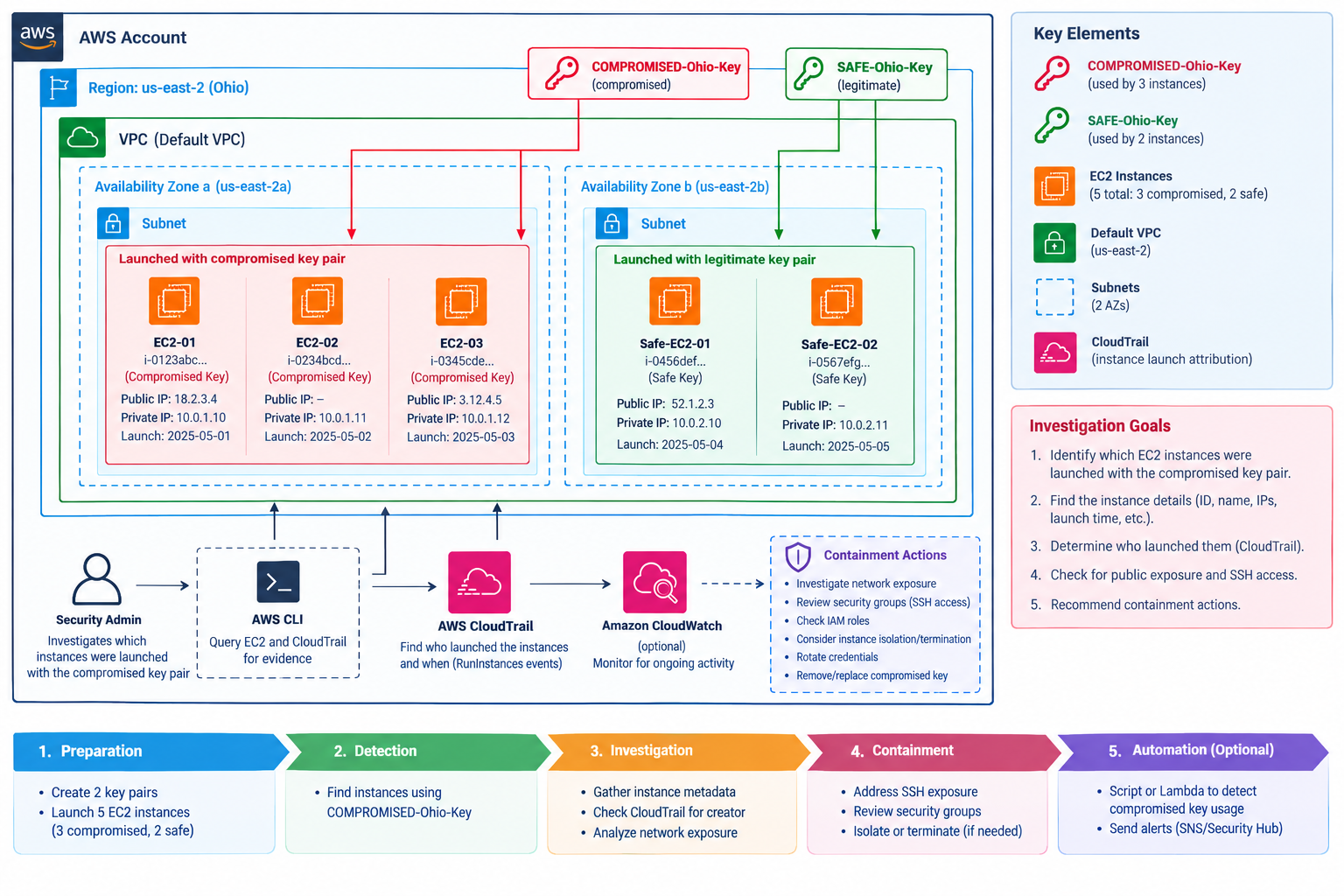
Our goal is to discover:
2. Learning Objectives
By the end of this lab, you should be able to:
- Identify EC2 key pairs in a region.
- Understand the relationship between an EC2 key pair and an instance.
- Query EC2 instances using AWS CLI.
- Identify instances associated with a specific key pair.
- Extract instance IDs, names, states, IP addresses and launch times.
- Investigate instances across an entire region.
- Use JMESPath queries with AWS CLI.
- Understand why a compromised key pair requires broader investigation.
- Use CloudTrail to investigate historical EC2 activity.
- Identify limitations of EC2 key-pair investigation.
- Build an automated key-pair exposure detector.
3. Prerequisites
You need:
- An AWS account
- AWS CLI
- Permissions to work with EC2
- A region set to Ohio:
4. Lab Environment
We’re going to create:
| Resource | Purpose |
|---|---|
COMPROMISED-Ohio-Key |
Simulated compromised key |
SAFE-Ohio-Key |
Legitimate key |
Compromised-EC2-01 |
Instance using compromised key |
Compromised-EC2-02 |
Instance using compromised key |
Compromised-EC2-03 |
Instance using compromised key |
Safe-EC2-01 |
Instance using safe key |
Safe-EC2-02 |
Instance using safe key |
aws ec2 describe-images \
  --region us-east-2 \
  --owners amazon \
  --filters \
    "Name=name,Values=al2023-ami-*" \
    "Name=architecture,Values=x86_64" \
    "Name=state,Values=available" \
  --query 'Images | sort_by(@, &CreationDate)[-1].{AMI:ImageId,Name:Name}' \
  --output table --no-cli-pager

---------------------------------------------------------------------------------------
|                                   DescribeImages                                    |
+------------------------+------------------------------------------------------------+
|           AMI          |                           Name                             |
+------------------------+------------------------------------------------------------+
|  ami-0ed236910cac70423 |  al2023-ami-minimal-2023.12.20260917.1-kernel-6.18-x86_64  |
+------------------------+------------------------------------------------------------+

# Save ami to a variable
AMI_ID="ami-0ed236910cac70423"
5. Launch the Compromised Instances
6. Launch Legitimate Instances
You can also use the attached CloudFormation template to deploy the five (5) ec2 instances
STOP
Remember to create the two ec2 key pairs either by using the above aws cli commands or manually creating them on the AWS Console before running the below CloudFormation template
AWSTemplateFormatVersion: '2010-09-09'
Description: Deploying five (5) ec2 instances with two different key-pairs

Parameters:
  LatestAmiId:
    Description: The latest Amazon Linux 2 AMI from the Parameter Store
    Type: AWS::SSM::Parameter::Value<AWS::EC2::Image::Id>
    Default: /aws/service/ami-amazon-linux-latest/amzn2-ami-hvm-x86_64-gp2

  InstanceType:
    Description: EC2 instance type
    Type: String
    Default: t2.micro
    AllowedValues:
      - t3.micro
      - t2.micro
    ConstraintDescription: must be a valid EC2 instance type.

Resources:

  ec2Instances1:
    Type: AWS::EC2::Instance
    Properties:
      KeyName: COMPROMISED-Ohio-Key
      ImageId: !Ref LatestAmiId
      InstanceType: !Ref InstanceType
      Monitoring: true
      Tags:
        - Key: Name
          Value: Compromised-EC2-01

  ec2Instances2:
    Type: AWS::EC2::Instance
    Properties:
      KeyName: COMPROMISED-Ohio-Key
      ImageId: !Ref LatestAmiId
      InstanceType: !Ref InstanceType
      Monitoring: true
      Tags:
        - Key: Name
          Value: Compromised-EC2-02

  ec2Instances3:
    Type: AWS::EC2::Instance
    Properties:
      KeyName: COMPROMISED-Ohio-Key
      ImageId: !Ref LatestAmiId
      InstanceType: !Ref InstanceType
      Monitoring: true
      Tags:
        - Key: Name
          Value: Compromised-EC2-03

  ec2Instances4:
    Type: AWS::EC2::Instance
    Properties:
      KeyName: SAFE-Ohio-Key
      ImageId: !Ref LatestAmiId
      InstanceType: !Ref InstanceType
      Monitoring: true
      Tags:
        - Key: Name
          Value: Safe-EC2-01

  ec2Instances5:
    Type: AWS::EC2::Instance
    Properties:
      KeyName: SAFE-Ohio-Key
      ImageId: !Ref LatestAmiId
      InstanceType: !Ref InstanceType
      Monitoring: true
      Tags:
        - Key: Name
          Value: Safe-EC2-02
After using either the AWS CLI or CloudFormation template, you should have a total of five (2) ec2 instances running in the us-east-2 region.
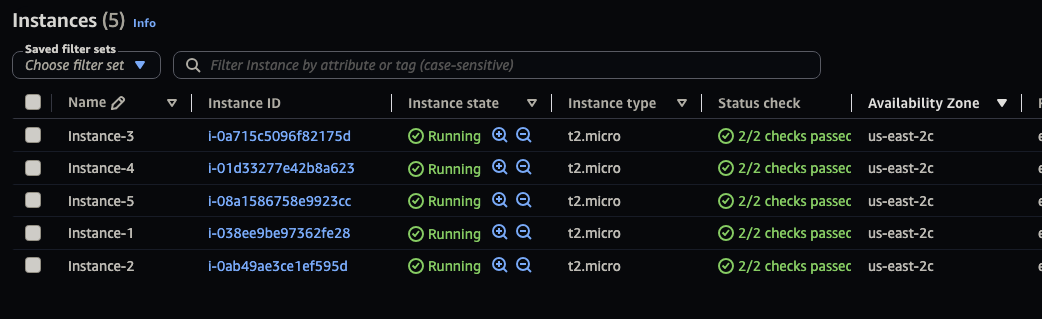
Investigation Begins
Now pretend you're the security administrator.
You are given only:
You don't know:- Instance IDs
- Instance names
- Private IPs
- Public IPs
- Launch times
- Number of affected instances
Your job is to discover them.
Investigation #1 — List All Instances
Start broad.
aws ec2 describe-instances \
  --region us-east-2 \
  --query 'Reservations[].Instances[].{
    InstanceId:InstanceId,
    State:State.Name,
    KeyName:KeyName
  }' \
  --output table
You might see:
-----------------------------------------------------
|                 DescribeInstances                 |
+----------------------+----------+-----------------+
| InstanceId           | State    | KeyName         |
+----------------------+----------+-----------------+
| i-0123456789abcdef0  | running  | COMPROMISED...  |
| i-023456789abcdef01  | running  | COMPROMISED...  |
| i-03456789abcdef012  | running  | COMPROMISED...  |
| i-0456789abcdef0123  | running  | SAFE-Ohio-Key   |
| i-056789abcdef01234  | running  | SAFE-Ohio-Key   |
+----------------------+----------+-----------------+
This is your first major clue.
Investigation #2 — Filter by Key Name
Now narrow the investigation.
aws ec2 describe-instances \
  --region us-east-2 \
  --filters \
    Name=key-name,Values=COMPROMISED-Ohio-Key \
  --query 'Reservations[].Instances[].{
    InstanceId:InstanceId,
    KeyName:KeyName,
    State:State.Name
  }' \
  --output table
Expected:
------------------------------------------------
|              DescribeInstances               |
+----------------------+----------+-----------+
| InstanceId           | KeyName  | State     |
+----------------------+----------+-----------+
| i-0123456789abcdef0  | COMP...  | running   |
| i-023456789abcdef01  | COMP...  | running   |
| i-03456789abcdef012  | COMP...  | running   |
+----------------------+----------+-----------+
This is the core answer to the investigation.
You've identified the instances launched using the compromised key pair.
Investigation #3 — Get More Information
Now expand your investigation.
aws ec2 describe-instances \
  --region us-east-2 \
  --filters \
    Name=key-name,Values=COMPROMISED-Ohio-Key \
  --query 'Reservations[].Instances[].{
    InstanceId:InstanceId,
    Name:Tags[?Key==`Name`].Value|[0],
    State:State.Name,
    PrivateIP:PrivateIpAddress,
    PublicIP:PublicIpAddress,
    KeyName:KeyName,
    LaunchTime:LaunchTime,
    InstanceType:InstanceType,
    AZ:Placement.AvailabilityZone
  }' \
  --output table
This gives you an investigation table similar to:
---------------------------------------------------------------------------
| InstanceId | Name              | State    | PrivateIP | PublicIP | Launch |
---------------------------------------------------------------------------
| i-012...   | Compromised-EC2-01| runing   | 10.0.1.10 | 3.x.x.x  | ...    |
| i-023...   | Compromised-EC2-02| runing   | 10.0.1.11 | 3.x.x.x  | ...    |
| i-034...   | Compromised-EC2-03| runing   | 10.0.1.12 | 3.x.x.x  | ...    |
---------------------------------------------------------------------------
Investigation #4 — Count the Affected Instances
A useful incident-response question:
How many EC2 instances are affected?
aws ec2 describe-instances \
  --region us-east-2 \
  --filters \
    Name=key-name,Values=COMPROMISED-Ohio-Key \
  --query 'length(Reservations[].Instances[])'
Expected:
Investigation #5 — Get Only Instance IDs
This is useful for automation.
aws ec2 describe-instances \
  --region us-east-2 \
  --filters \
    Name=key-name,Values=COMPROMISED-Ohio-Key \
  --query 'Reservations[].Instances[].InstanceId' \
  --output text
AFFECTED_INSTANCES=$(aws ec2 describe-instances \
  --region us-east-2 \
  --filters \
    Name=key-name,Values=COMPROMISED-Ohio-Key \
  --query 'Reservations[].Instances[].InstanceId' \
  --output text)

echo $AFFECTED_INSTANCES
Investigation #6 — Get the Full Instance Metadata
For a security investigation, I'd want considerably more information.
Try:
aws ec2 describe-instances \
  --region us-east-2 \
  --filters \
    Name=key-name,Values=COMPROMISED-Ohio-Key \
  --query 'Reservations[].Instances[].{
    InstanceId:InstanceId,
    ImageId:ImageId,
    InstanceType:InstanceType,
    KeyName:KeyName,
    PrivateIP:PrivateIpAddress,
    PublicIP:PublicIpAddress,
    SubnetId:SubnetId,
    VpcId:VpcId,
    AZ:Placement.AvailabilityZone,
    LaunchTime:LaunchTime,
    State:State.Name,
    IAMRole:IamInstanceProfile.Arn
  }' \
  --output table
This begins to resemble an actual cloud incident-response investigation.
Output example:
--------------------------------------------------------------------------------------------------------------------------------------------------------------------------------------------------------------------------------------------------
|                                                                                                                DescribeInstances                                                                                                               |
+------------+----------+------------------------+----------------------+---------------+-----------------------+----------------------------+----------------+----------------+----------+----------------------------+-------------------------+
|     AZ     | IAMRole  |        ImageId         |     InstanceId       | InstanceType  |        KeyName        |        LaunchTime          |   PrivateIP    |   PublicIP     |  State   |         SubnetId           |          VpcId          |
+------------+----------+------------------------+----------------------+---------------+-----------------------+----------------------------+----------------+----------------+----------+----------------------------+-------------------------+
|  us-east-2c|  None    |  ami-0ad11288f7f6d33d8 |  i-0a715c5096f82175d |  t2.micro     |  COMPROMISED-Ohio-Key |  2026-09-23T01:23:29+00:00 |  172.31.38.121 |  3.19.111.26  |  running |  subnet-011887d38a7da01be  |  vpc-fh8s9ghsjsy23h68  |
|  us-east-2c|  None    |  ami-0ad11288f7f6d33d8 |  i-038ee9be97362fe28 |  t2.micro     |  COMPROMISED-Ohio-Key |  2026-09-23T01:23:29+00:00 |  172.31.35.97  |  3.144.76.65 |  running |  subnet-011887d38a7da01be  |  vpc-fh8s9ghsjsy23h68  |
|  us-east-2c|  None    |  ami-0ad11288f7f6d33d8 |  i-0ab49ae3ce1ef595d |  t2.micro     |  COMPROMISED-Ohio-Key |  2026-09-23T01:23:29+00:00 |  172.31.47.209 |  3.101.153.229 |  running |  subnet-011887d38a7da01be  |  vpc-fh8s9ghsjsy23h68  |
+------------+----------+------------------------+----------------------+---------------+-----------------------+----------------------------+----------------+----------------+----------+----------------------------+-------------------------+
Investigation #7 — Find the Instance Creator
This is where the lab gets more interesting.
Finding the affected EC2 instances answers:
What was affected?
But the next question is:
Who launched them?
For that, EC2 inventory isn't enough.
You need AWS CloudTrail.
Search CloudTrail for:
Using the AWS CLI:
aws cloudtrail lookup-events \
  --region us-east-2 \
  --lookup-attributes AttributeKey=EventName,AttributeValue=RunInstances \
  --query 'Events[].{
    Time:EventTime,
    User:Username,
    Event:EventName,
    EventId:EventId
  }' \
  --output table
Output
----------------------------------------------------------------------------------------------------
|                                           LookupEvents                                           |
+--------------+----------------------------------------+-----------------------------+------------+
|     Event    |                EventId                 |            Time             |   User     |
+--------------+----------------------------------------+-----------------------------+------------+
|  RunInstances|  759e86cf-0552-44b9-8bb8-a94188ff06e8  |  2026-09-22T21:23:30-04:00  |  dcyberguy |
|  RunInstances|  77bf370d-b9ee-40ea-8d43-425a50be2bae  |  2026-09-22T21:23:30-04:00  |  dcyberguy |
|  RunInstances|  783c0681-7b9a-4be5-b502-bc6e57d86f09  |  2026-09-22T21:23:30-04:00  |  dcyberguy |
|  RunInstances|  d7e9e583-4feb-478f-814f-0ec1dcb6b69a  |  2026-09-22T21:23:30-04:00  |  dcyberguy |
|  RunInstances|  e4dc01f6-6f0f-41d2-a5a7-d4685cc0d78e  |  2026-09-22T21:23:30-04:00  |  dcyberguy |
|  RunInstances|  0b191cff-84b9-4ee0-8756-5a97e50a4b3e  |  2026-09-22T19:03:39-04:00  |  dcyberguy |
|  RunInstances|  79ce558d-66ef-4f93-86f1-ac7cccc04fb4  |  2026-09-22T19:03:39-04:00  |  dcyberguy |
|  RunInstances|  e8d70be2-d936-42f4-a797-80d7a022a97c  |  2026-09-22T19:03:39-04:00  |  dcyberguy |
|  RunInstances|  f7ef907b-ef4f-4f6b-b7ab-c812fc2f4feb  |  2026-09-22T19:03:39-04:00  |  dcyberguy |
|  RunInstances|  517b6079-90ad-4ac4-a6f9-04501bcfdeac  |  2026-09-22T19:03:38-04:00  |  dcyberguy |
dcyberguy deployed those Instances.
CloudTrail Investigation
For a specific event:
aws cloudtrail lookup-events \
  --region us-east-2 \
  --lookup-attributes AttributeKey=EventName,AttributeValue=RunInstances \
  --max-results 50 \
  --output json | jq
{
  "Events": [
    {
      "EventId": "759e86cf-0552-44b9-8bb8-a94188ff06e8",
      "EventName": "RunInstances",
      "ReadOnly": "false",
      "AccessKeyId": "ASIAZQ3DSY5BYIO3D26R",
      "EventTime": "2026-09-22T21:23:30-04:00",
      "EventSource": "ec2.amazonaws.com",
      "Username": "dcyberguy",
      "Resources": [
        {
          "ResourceType": "AWS::EC2::VPC",
          "ResourceName": "vpc-0cd751f4ab12dc4b9"
        },
        {
          "ResourceType": "AWS::EC2::Ami",
          "ResourceName": "ami-0ad11288f7f6d33d8"
        },
        {
          "ResourceType": "AWS::EC2::NetworkInterface",
          "ResourceName": "eni-04a8c143fcd2b8faa"
        },
        {
          "ResourceType": "AWS::EC2::Instance",
          "ResourceName": "i-0ab49ae3ce1ef595d"
        },
        {
          "ResourceType": "AWS::EC2::KeyPair",
          "ResourceName": "COMPROMISED-Ohio-Key"
        },

        << SNIP FOR BREVITY >>
Look out for Username, sourceIPAddress, userAgent, and requestParameters.
These can help establish:
WHO
 |
 +-- IAM user?
 +-- IAM role?
 +-- SSO session?
 +-- assumed role?
 |
WHEN
 |
 +-- timestamp
 |
WHERE
 |
 +-- source IP
 |
HOW
 |
 +-- AWS Console
 +-- CLI
 +-- SDK
 +-- automation
 |
WHAT
 |
 +-- instance launched
 +-- AMI
 +-- subnet
 +-- key pair
Important Security Insight
There is an important distinction here.
If someone compromises an EC2 private key such as:
that doesn't automatically mean they have AWS IAM credentials.
The EC2 key pair is primarily used for operating-system access to the instance.
For example:
These are different authentication mechanisms.
A compromised EC2 key therefore requires investigation of both:
Layer 1 — EC2 infrastructure
Layer 2 — OS access
Advanced Investigation
Once you've identified:
investigate their network exposure.
For example:
aws ec2 describe-instances \
  --region us-east-2 \
  --instance-ids i-0123456789abcdef0 \
  --query 'Reservations[].Instances[].SecurityGroups' \
  --output table
Then inspect the security groups:
Ask:
- Does SSH port 22 allow
0.0.0.0/0? - Is SSH restricted to corporate IP ranges?
- Does the instance have a public IP?
- Is the instance behind a bastion host?
- Is Systems Manager available?
- Does the instance have an IAM role?
- What resources can that role access?
Investigate SSH Exposure
This is a particularly important part of the scenario.
Look for:
with:
That combination could mean the compromised private key potentially provides an external SSH access path.
You can inspect security-group rules:
aws ec2 describe-security-groups \
  --region us-east-2 \
  --query 'SecurityGroups[].{
    GroupId:GroupId,
    GroupName:GroupName,
    Inbound:IpPermissions
  }' \
  --output json
Incident Response Phase
Now move from Detection to Containment.
A realistic security team might consider:
             COMPROMISED KEY
                    |
                    v
           Identify instances
                    |
                    v
        +-----------+-----------+
        |                       |
        v                       v
   Investigate              Contain
        |                       |
        |                +------+------+
        |                |             |
        v                v             v
   CloudTrail        Remove SSH    Isolate EC2
   VPC Flow Logs     exposure
   SSM logs
   OS logs
Important: Don't Simply Delete the Key Pair
A common beginner mistake would be:
and assume the problem is solved.
It isn't.
Deleting the EC2 key-pair object does not retroactively remove the corresponding public key from the operating system of instances where it was already installed.
For an already-running Linux instance, the public key may exist in:
Therefore:
That's an important security lesson.
Containment Exercise
For this lab, don't immediately terminate the instances.
Instead, practice an investigation-first approach.
For each affected instance determine:
Instance ID
        |
        +-- Public IP
        +-- Private IP
        +-- Security Group
        +-- IAM Role
        +-- Subnet
        +-- VPC
        +-- AMI
        +-- Launch Time
        +-- Key Pair
        +-- CloudTrail creator
Create an investigation report:
| Instance | Key | Public IP | SG | IAM Role | Launch Time | Creator |
|---|---|---|---|---|---|---|
| EC2-01 | COMPROMISED | ? | ? | ? | ? | ? |
| EC2-02 | COMPROMISED | ? | ? | ? | ? | ? |
| EC2-03 | COMPROMISED | ? | ? | ? | ? | ? |